Airtripper Extruder Filament Force Sensor – Announcement

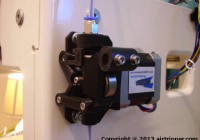
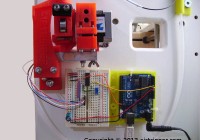
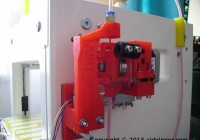
Yep, my 3d printer now has a filament force sensor. It works great and it looks awesome. I’m just at the end of a second full day of testing and the installation has not caused any print quality issues using the same g-code as before.

My 3d printer is tied up doing production runs so not yet had the opportunity to study cause and effect with different Skeinforge settings. Basically I’ve been studying live graphs from the production runs; checking for consistency between print jobs and during print runs. The graph below is a 100 second snapshot of a production run I was doing.

3D Printer Extruder Force Sensor Graph Sample

3D Printer Extruder Filament Force Sensor graph

From the graph it is easy to tell when the printer is printing and when it is not. The drops are the retractions and you can see that the nozzle loses pressure after each retraction. The retractions also show a period of travel without printing, and the longer the travel – the more pressure is lost. Also, a bunch of retractions together shows a decline in nozzle pressure with each retraction.

Continue reading

Posted in 3D Printer Extruders | Tagged | 2 Comments

J-Head MK-IV Hot End Clone Design Quick Review

J-Head IV Hot End Clone Design
J-Head MK-IV Hot End Clone Design

Got myself a J-Head MK-IV Hot End clone, from Ebay (snipermand), to see if it will be good enough to replace my heavily modified Mendel Parts Hotend V9 clone; and since the J-Head MK-IV is a clone, this is my quick review to share my purchase experience. The review also includes an illustration of how the different components fit together, how the J-Head clone stacks up against the original J-Head and conclude whether Hot End clones are really worth considering.

The J-Head MK-IV will be the third Hot End clone I’ve purchased in the last 12 months with the hope of putting together a decent extruder system for 1.75mm PLA filament. The Hot End I’m using right now is not as good as it should be and it’s a Mendel Parts V9, the first clone I purchased, which I had to heavily modify due to a manufacturing or design error made by the supplier in India. The second clone I purchased was the MBE Extruder V9 from qu-bd.com, and like for many other users, it just would not work with the 1.75mm PLA filament. This Hot End kit is a Makerbot Stepstruder clone.

J-Head MK-IV Hot End Clone Design

3D Printer J-Head IV Hot End Clone Illustraion
J-Head MK-IV Hot End Clone Illustration

The illustration above shows the clone version of the J-Head MK-IV Hot End and looks similar to the original J-Head supplied by hotends.com. The version I have is with the aluminium nozzle/heater combination which is also available in brass (J-Head MK-IV-B). The overall machining quality of this nozzle is very good and was delivered with the main components pre-assembled, and has some kind of red sealant locking the peek insulator on to the aluminium nozzle/heater. A resistor and thermistor was included with some wire, wire insulating PTFE tubing and connectors which all needed assembly.

Continue reading

Posted in 3D Printer Hot End | Tagged , , | 8 Comments

Marlin Firmware v1, Basic Configuration Set-up Guide

Marlin Firmware v1 on 20x4 LCD Panel Display
Marlin Firmware v1 on 20×4 LCD Panel Display

I’ve just updated the Marlin firmware on my Sumpod 3d printer since I’m always keen to have the latest features and bug fixes. To be honest, I don’t mess with the firmware that much, and if it wasn’t for the configuration file from my last version, I would struggle to remember what sort of configuration I would need to set in the latest firmware version.

Anyway, while my latest experience with 3d printer firmware is still fresh in the mined, I’ll share some notes about what settings you need to know to get a basic Marlin firmware configured enough to get a 3d printer working. The notes will focus on the Marlin firmware v1 and will include setting up a click encoder and LCD panel. But before going straight into getting the Marlin firmware configured, I’ll first quickly introduce you to a handy tool called WinMerge.

WinMerge

WinMerge can compare both folders and files
WinMerge can compare both folders and files – Marlin Firmware being compared

For anybody that’s in the business of editing and configuring 3d printer firmware files such as the Marlin firmware, I would suggest downloading a copy of WinMerge. It’s free, open source software, and is cross platform, so the same tool will run on Windows and Linux.

You can use WinMerge to compare a clean version of your Marlin firmware against your edited version that you are using on your 3d printer. This will help to keep track and note all the changes made to the files that you might want to transfer to a newer firmware version.

You can open just two files to compare or you can open two folders to compare. Comparing 3d printer firmware folders will allow you to quickly spot which files that have been edited.

Continue reading

Posted in 3D Printer Firmware | Tagged , , , | 7 Comments

Airtripper’s Bowden Extruder V3 – Updated Design

Airtripper's Direct Drive Bowden Extruder V3
Airtripper’s Direct Drive Bowden Extruder V3

The Airtripper’s Direct Drive Bowden Extruder is now at version 3 with the design files ready to download from Thingiverse. A lot of work went into the design to improve the usabillity and the look of the extruder. The design is stronger with a much cleaner 3d printed finish, and filament changing is now much easier than before.

The bowden extruder was originally designed to fit the Sumpod 3d printer to replace the bulky MDF extruder housing that was awkward to use. However, the bowden extruder can be used for other 3d printers making use of it’s simple bracket, and the extruder has been popular with the Rostock delta 3d printer. A tube bracket is now availble for attaching to the bowden extruder to help guide the filament from the filament spool. more about that here at Sumpod 3D Printer Filament Handling for Bowden Extruder.

You will find more about this bowden extruder on the following page: Bowden Extruder Upgrade Part 3.

The popularity of The Airtripper’s bowden extruder was boosted when the extruder was included in the development of the awesome Rostock 3D Printer (delta robot 3D printer). To see the bowden extruder in action on the Rostock, watch the youtube clip below.


Download with Vixy | YouTube to MP3

Continue reading

Posted in 3D Printer Extruders | Tagged , , , , , , | 15 Comments

Sumpod 3D Printer Filament Handling for Extruder

Sumpod 3D Printer With Reel Roller Rack

The more improvements and new features added to the Sumpod 3d printer the more I want to use the 3d printer, and adding better filament handling has gone a long way to improve the 3d printer’s ease of use.

The Sumpod’s sturdy construction has allowed me to set up a filament spool rack on the top of the printer, and adding filament feed brackets to guide the filament round to the extruder keeps friction to a minimum during the printer’s operation. This set-up will go a long way to reduce the printer’s set-up and shutdown time because the filament spool can now be left at the printer.

I’ve made the design files available for download from thingiverse should anybody want to use them. The design files might not suit all Sumpod 3d printer configurations, but the designs should provide inspirations to those looking to improve their own filament material handling.

Sumpod 3D Printer outside – are you mad!

Well, to get the best clear pictures, I make the effort to get the Sumpod outside. I have to make sure it’s a dry day though because getting the MDF case damp might upset the printer’s build platform levelling :) . I’ve got more features and improvements lined up for this printer so it looks like I’ll be taking it outside a few more times yet.

Continue reading

Posted in SUMPOD | Tagged , , , , , | 21 Comments

Dial Indicator for Build Bed Level Test

Dial indicator for 3d printer build bed level test

I’ve designed and printed a bracket for attaching a Dial Indicator (purchased on Ebay) to the 3d printer for accurate build platform levelling. I can now test to reduce inclines on the heated build bed to a very small fraction of the 0.25mm layer height I normally print at.

I have made the design files for the bracket available for download and the link to the files can be found towards the end of this post. The OpenSCAD file can be edited easily to make the bracket fit different 3d printers. 

Levelling Without the Dial Indicator

I had a problem with getting large 3d printing projects to work due to the 3d printer build bed not being accurately level. I say accurately level because there is very little tolerances when printing layers as thin as 0.25mm and less, and the larger the print project footprint on the build bed area, the smaller the tolerances acceptable. While I did not have a Dial Indicator, I was using a business card of some sort for bed levelling, and this worked well enough for most printing projects, especially those with the smaller footprints on the build bed area. So to improve 3d printer build bed levelling accuracy, I decided to go with the Dial Indicator.

Result Of 3D Printer Hot End Extruding Too Close To The Platform

The Symptoms Of Poor Levelling - One of the more serious symptoms is caused when the Hot End nozzle gets too close to the build platform while extruding plastic up an incline. The extruded plastic spreads sideways from the nozzle tip causing ridges to form in the first printed layer. The ridges usually form towards one edge or one corner where the incline of the build platform is at its highest.

If ridges are formed, the first printed layer will look like a ploughed farmers field but messier, with ridges getting deeper towards one side. You usually get large clumps of plastic build up along the edge of the problem area. If the ridges are formed high enough, the Hot End nozzle could collide with the ridges which can cause axis motion to be disrupted and cause subsequent layers to be printed out of alignment. Using a Dial Indicator to level the 3d printer build platform would help to avoid those ridges and clumps of plastic build up.

Continue reading

Posted in 3D Printing Project | Tagged , , , | Leave a comment

Hot End Design on 3D Printer Extruder

3D Printer Extruder Hot End Close Up

So, this is an introduction to my latest 3d printer extruder system with a detailed view of the Hot End, Cold End and Nozzle. There are plenty of pictures and a detailed illustration that shows details about the 3d printer extruder system I’m currently using. I explain some of the pros and cons, and explain why the latest extruder system I’m using works.

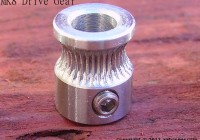
I’m still using a Twin Drive Extruder System I developed to push the 1.75mm Polylactic acid (PLA) filament into, what used to be, a very stubborn nozzle. However, forcing the filament into the nozzle was not the answer and some investigation work needed to be done to make the system work better. A new Hot End is purchased and after much tweaking, the extruder set-up is now working as well as it can be and I should be able to revert back to the single filament drive extruder upgrade, freeing up a stepper motor. I’ve got a new extruder stepper motor drive gear coming from the US which should provide improved grip on the filament giving more pushing power with a single stepper motor.

Continue reading

Posted in 3D Printer Hot End | Tagged , , , , , , | Leave a comment

Resistance Wire Heated Build Platform DIY Tutorial

Resistance Wire Heated Build Platform, a few notes about my own heated build platform build for the SUMPOD and a tutorial for those who are looking to build their own. It’s quite a long piece because I have tried to make it as complete as possible. A couple of plans have been thrown in with some images to boot, which summarises much that have been written here, so a good place to start is with the images. I’ll be using the tutorial myself to improve the performance of my own heated build platform.

Heated build platform from frontThe notes will be about building a 3d printer heated build platform out of 3mm window glass and nichrome wire (resistance wire). This setup is ideal for printing PLA because it sticks to window glass without the need for any kind of tape, and PLA pops off the glass easily as the platform cools at the end of printing. Window glass is good for temperatures up to 80 degrees C which may not be hot enough for ABS printing. If ABS is how you roll then oven glass or ceramic glass may be a better option than window glass. The temperature I usually set, for printing with PLA filament, is between 55 degrees C and 60 degrees C.

Use the information at your own risk and do not leave the 3d printer unattended during operation because of risk of fire, safety first.

Continue reading

Posted in Heated Build Platform | Tagged , , , , | Leave a comment